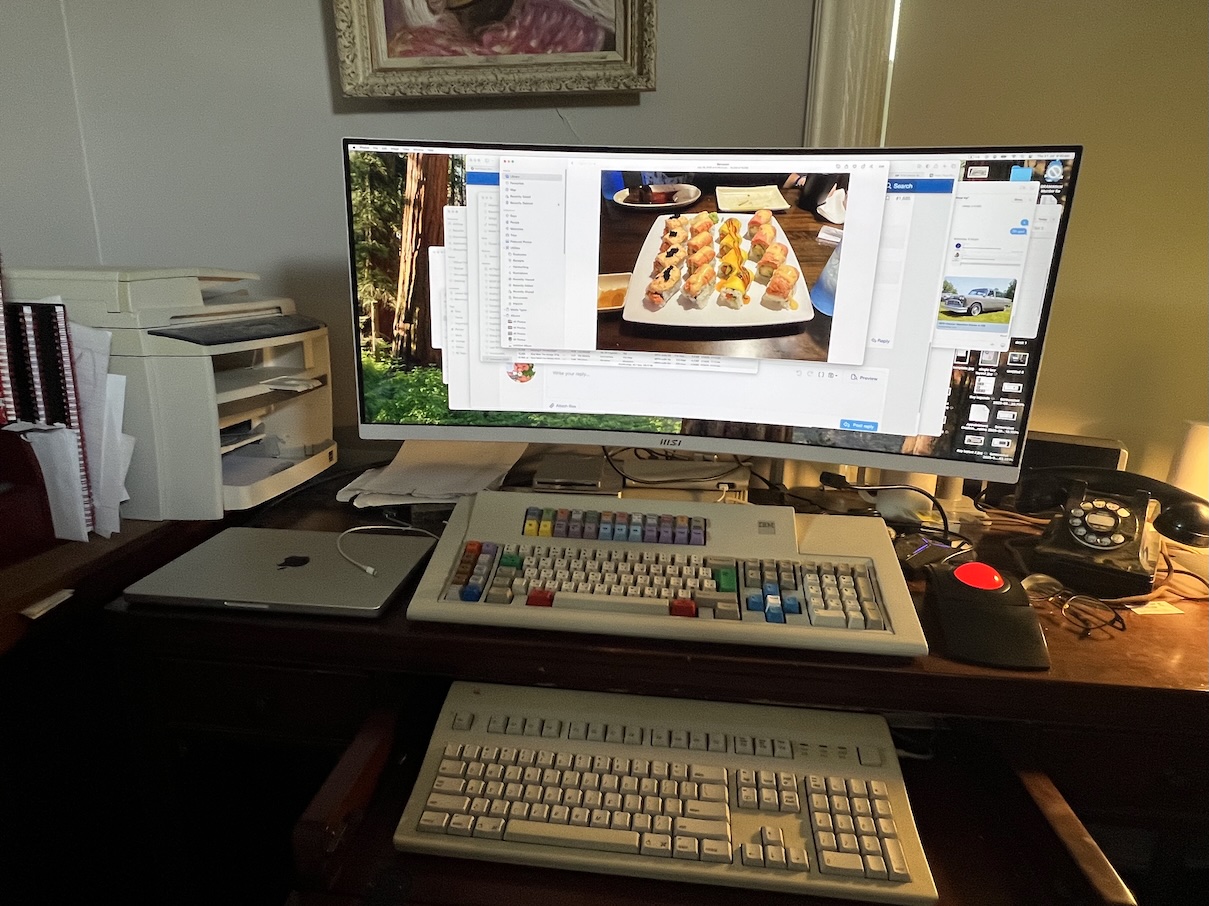
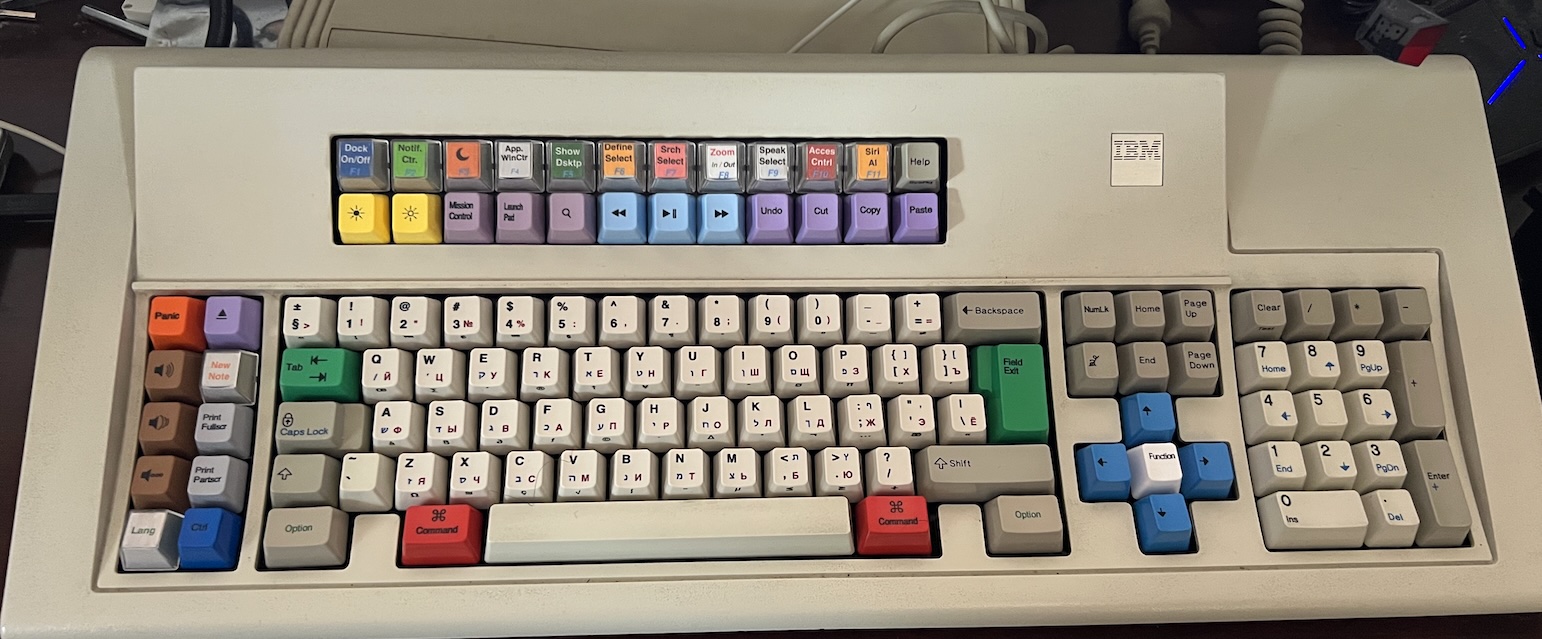
As I’ve said before, I have two setups, my van and my home office. They are similar but not entirely identical. I just finished the replacement of many of the keycaps on both of my Model M Battleships. The IBM keyboard in the home office shown here is a 3/29/88 1392149, which is rare Type I model in that it has a DIN180 PC connector rather than a terminal connector. The physical modifications are as follows:
- All pebble keys besides the “Option” keys are original IBM keycaps, two piece where applicable, but some are not original to the keyboard- the originals are stored in a labeled bag where not used
- The numpad functions are original IBM keycaps, but have been reoriented to a standard PC numpad layout, including the replacement of two separate keys for a 2-unit vertical + key. This was done by disabling the lower key in Vial and using a bar-stabilised key: the original spring and flipper are still in there.
- The “Lang” (which toggles between current language and the last language used on a Mac, usually between English and Russian, товарищи) and “New Note” (which opens a new note in the Mac notes app), as well as the first eleven keys on the upper function row are relegendable’s from Elipse’s/Joe’s Model F Project
- The arrow keys on the cross nav (I actually prefer that to the T-nav) are from Model F Project’s Mopar Blue set.
- The remaining keys, including the *grey* Print Screen keys, are from Unicomp, and were custom printed with a) English and shift outputs (where applicable) in black, b) Hebrew keyboard outputs in blue, c) Russian keyboard outputs in red, and d) English Mac option codes (output of pressing Option+[key] on a Macintosh) printed on the fronts of the keys; there is an error in the printing on 3, 4, 5, and 6 where £ was left off, and the symbols transposed to the left one key, with 6 blank; this error was *mine* as Unicomp had me use a template to design the keys and they printed exactly as I laid them out.
- The Tab and Field Exit keys were ordered separately because of a miscommunication in the very long discussion we had on the order; the keyboard’s original ISO enter key was bar stabilised, so installing this newer insert stabilised key required installing an insert, but fortunately I had some. This was true of both this and the van keyboard. I am only going to mention the differences between them when I post that, of which there are few.
In terms of function, most of the keys are very self-explanatory, but here are the ones that are not:
- Panic is simply escape. Included in the order, although I didn’t specify it, were orange “Don’t Panic” keys which I ended up installing on my New Model Ms in place of Escape. I thought those were cute, but it would have been cuter if the price for a custom keyset was $42 instead of $43.
- I have the Eject symbol on both keyboards, but I only have a software eject CD drive hooked up on the home setup. That’s what it ejects.
- “NumLk” (and “Num Lock” on the other keyboard) and the Function key do the same thing, but differently: NumLk toggles between layer one and layer two, while Function momentarily activates the opposite layer. Layer 2 reconfigures the “Ctrl” key to “LGui”, the “Option” keys to Control, the “Command” keys to Alt, the upper row of function keys to directly output F1-F12 (some of the designated keys do function by outputing an F code, while others do not) and also effectively turns the numpad into a navigation cluster as labeled. I’m digging around for blue-printed Num Lock keys.
- Moon key turns on/off Mac’s Do Not Disturb function.
- “App. WinCtr” takes all the windows of an application and displays them on screen at once; essentially Mission Control but for one app.
- “Define Select” looks up the definition of a selected word in the Mac’s dictionary.
- “Srch Select” uses a search engine to look up the selected word of phrase; I use Yandex which is why it’s not “Google Select”.
- “Zoom In / Out” turns on the zoom feature when held in conjunction with Command (which is why it’s read), zooms in when held in conjunction with Ctrl (which is why it’s blue) and out when held by itself.
- “Speak Select” reads selected text out loud.
- “Access Cntrl” opens the Accessibility Control Panel
The keyboard is connected to the computer by a TinkerBoy converter, and configured by Vial. This keyboard is not (yet) bolt modded, but sending it to ClickyKeyboards for that work is on my to do list- it doesn’t need it yet but it will eventually. This keyboard was an insanely expensive project, all in $360 (which will go up when I get it modded).
My trackball is a well known model, so I won’t go into detail on that, but you might notice I also have an Apple AEKII in the drawer. I do use that, too. Between them they are my favourite keyboards I’ve experienced so far on a computer, even though they are quite clearly very different. And yes, that phone is connected through a Cell-2-Jack, and it works for both receiving and dialling out calls.
- Picture 1.jpg (389.6 KiB) Viewed 2180 times
- Picture 2.jpg (322.74 KiB) Viewed 2180 times
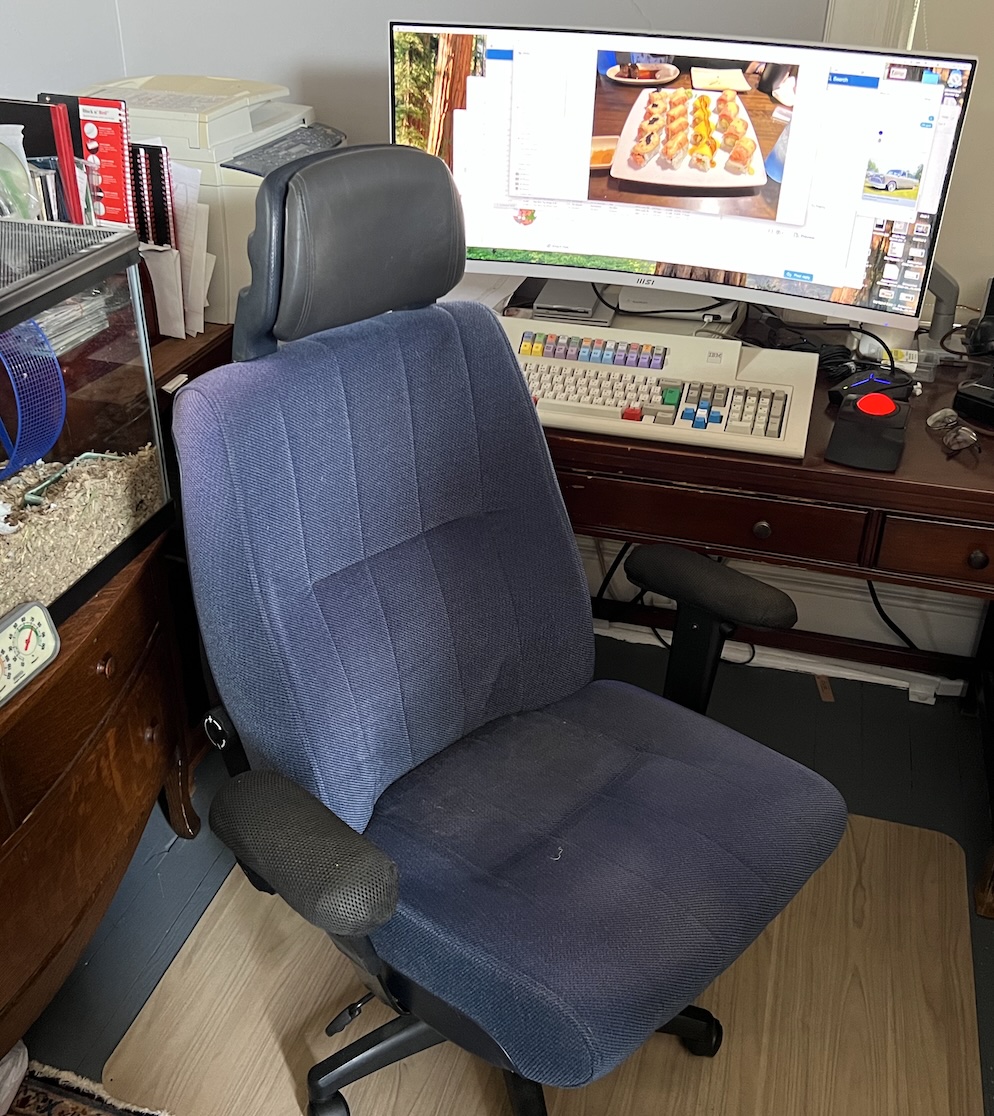
An interesting facet of my setup also includes my chair, which I built myself many years ago, although I not that long ago replaced the actual seat. The original was from a 1991 Volvo 240; this one is from a 1988 Volvo 240 (and smells vaguely of pot because the owner of the car I stole it out of apparently was into that). Insanely comfortable.
- Picture 3.jpg (416.15 KiB) Viewed 2180 times
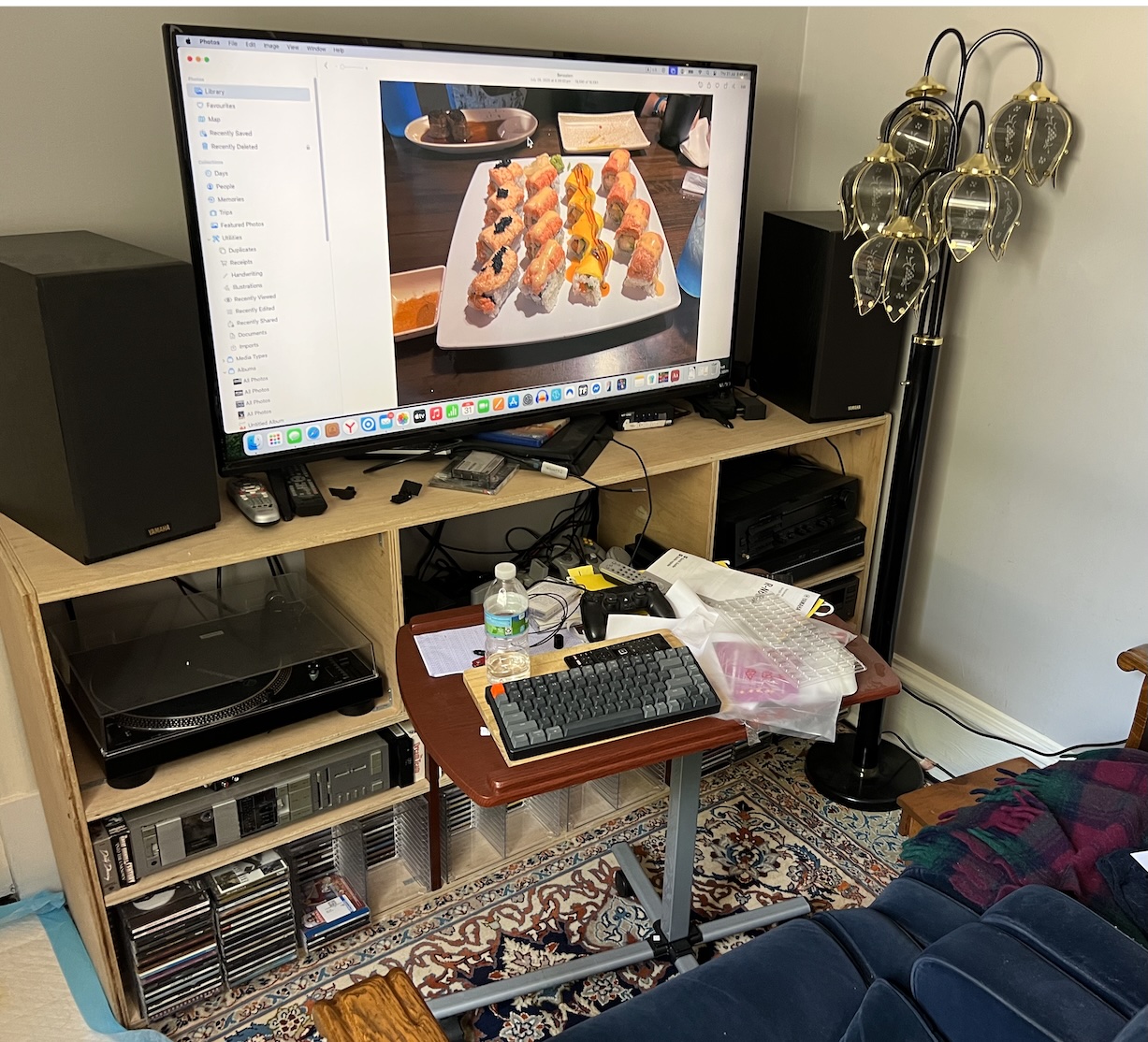
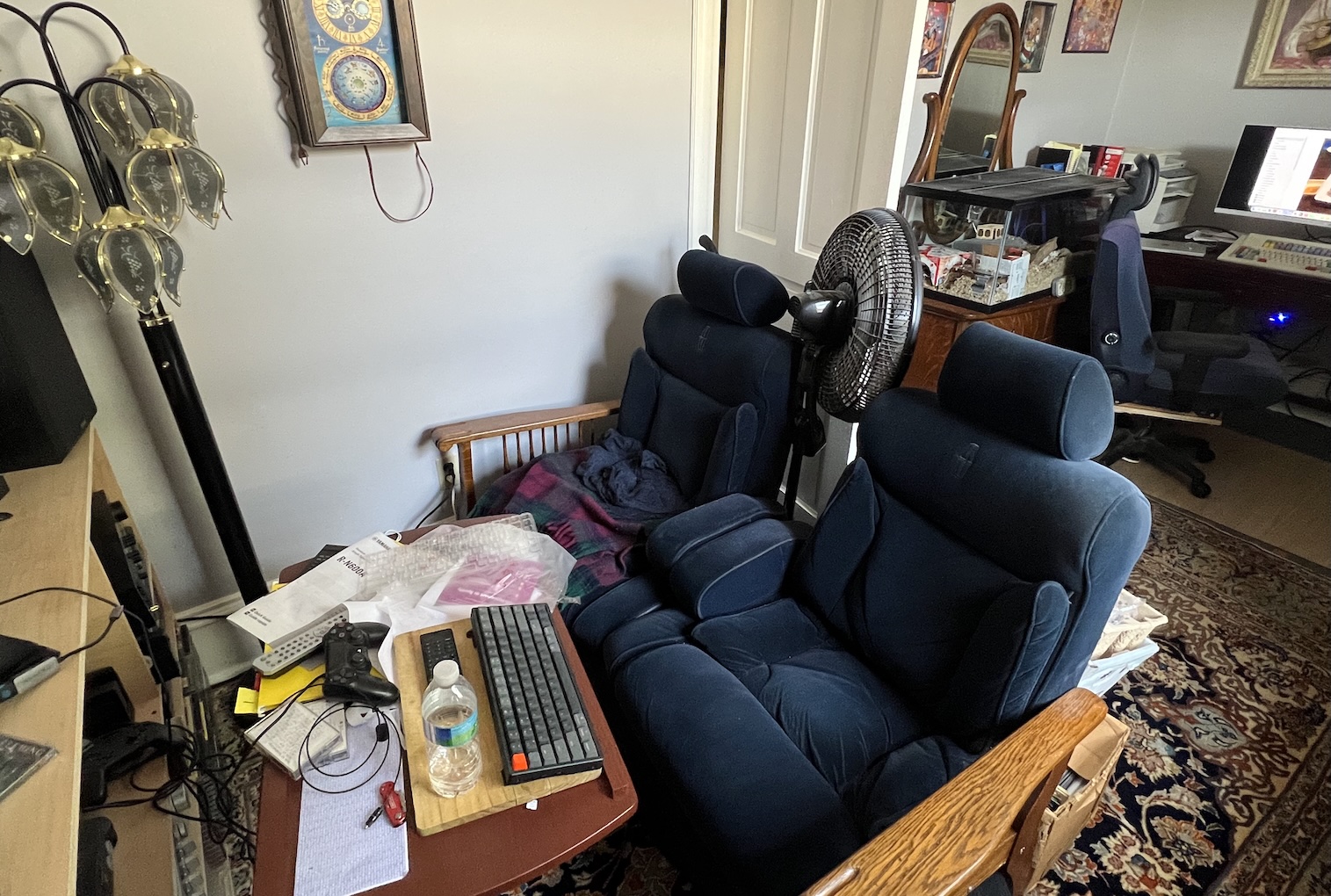
This next point is actually also part of the setup. The computer is wired for both video and sound to this setup, and I do mean wired: RCA cables and an HDMI that are run over the wall via conduits. The keyboard is the only wireless part of the setup. This stereo is the only thing I use for sound output from the computer, regardless of where I am sitting. Since this isn’t an audio forum, I won’t go into detail on it, but the system is setup, through switches and Ys, to be able to digitise from radio, CD, cassette, or record (33, 45, or 78) to the computer, or record computer audio output to cassette.
The Keychron keyboard and Keychron mouse are there to use the computer from that space, the primary reason for doing so is to be able to control the computer while doing music digitisation. It is just an HD TV, as I don’t watch much TV and a high end TV would be lost on me… and I wanted a TV that could output RCA analog audio, because when I first designed the setup, I was running an old Nakamichi RE-2, but that developed a fault so I have since “upgraded” to a Yamaha R-N600A which can receive digital sound.
I do intend to eventually get a USB-to-Bluetooth adaptor and swap out that Keychron with a Model M of some description, probably one of my now-unused Unicomp New Model Ms; they aren’t as good as an 80’s IBM M, but they knock that Keychron’s Cherry MX Blues into a cocked hat.
- Picture 4.jpg (512.8 KiB) Viewed 2180 times
The seat for this space was also something I built myself. The arms are off of a long otherwise discarded chair, the seat is from a 1989 Lincoln Town Car, the recline feature does work, and I built the support base out of ply and 2x4s. It is also quite comfortable for relaxing on; less so for productivity- the Volvo is better for that. My ferret, Churchill, is the one who is most fond of the thing.
- Picture 5.jpg (579.88 KiB) Viewed 2180 times