Page 1 of 1
Tipro and PS/2 in Windows 64bit
Posted: 14 Dec 2011, 18:35
by fireglow
I recently bought a Tipro MID-AM-KM128A on eBay.
The programming works flawlessly under WinXP, but I need to
be able to change the layout under Windows 7 64 bit.
Now, the Tipro website states that PS/2 and Windows 7 64 bit does not work:
"PS/2 communication is not supported in 64-bit systems. PS/2 content can be programmed over RS232 communication instead."
Does that mean I could program the keyboard if I'd use a USB-to-serial adapter together with a 9pin D-Sub to PS/2 adapter?
Posted: 14 Dec 2011, 19:52
by sixty
There is a newer version (5.7) which works for me on Windows 7 with the MID modules under 64bit.
http://www.tipro.net/download/chme570.exe
Edit: seems they have deleted the 5.7 version for some reason. Here is a mirror:
http://www.box.com/s/nrht6pie68pyzepana7r
Try it and report back

Posted: 14 Dec 2011, 20:25
by Minskleip
The latest version on tipro.net is 5.8. I previously had 5.7.7 which didn't support programming on 64 bit, which they still state. I'll try 5.8 now.
Posted: 14 Dec 2011, 21:07
by sixty
Minskleip wrote:The latest version on tipro.net is 5.8. I previously had 5.7.7 which didn't support programming on 64 bit, which they still state. I'll try 5.8 now.
It works for me in 64bit with 5.7
Posted: 14 Dec 2011, 21:13
by Minskleip
sixty wrote:Minskleip wrote:The latest version on tipro.net is 5.8. I previously had 5.7.7 which didn't support programming on 64 bit, which they still state. I'll try 5.8 now.
It works for me in 64bit with 5.7
5.8 didn't cut it, but I'll try yours as well. Fingers crossed!
Posted: 15 Dec 2011, 07:58
by fireglow
The 5.7.0 version crashes at statup with "Failed to open portIo device: error=2" :S
I'll just try with that weird adapter thing, it's only 50 cents, maybe it works.
Posted: 15 Dec 2011, 09:11
by CeeSA
maybe it depends which revesion of the controller is inside the tipro.
in all my tries i got the same output as fireglow....
I can not imagine the adapter works in way you explained.
some tipro boards has a serial connector too. imo this mean serial Tipro to serial PC connection....
good luck anyways
Posted: 15 Dec 2011, 09:33
by kbdfr
I would suggest reporting the problem to Tipro. They've proved very helpful with any questions in the past.
Posted: 27 Jan 2012, 22:22
by Icarium
Okay, I can't get it to work with neither the 5.8 from Tipro's website nor sixty's 5.7.
Maybe this homemade PS/2 cable is the problem. Can't really contact Tipro with this setup.
Does anybody have any other ideas?
Posted: 27 Jan 2012, 22:31
by 7bit
Icarium wrote:Okay, I can't get it to work with neither the 5.8 from Tipro's website nor sixty's 5.7.
Maybe this homemade PS/2 cable is the problem. Can't really contact Tipro with this setup.
Does anybody have any other ideas?
Where are you located. I can send you a cable.
Posted: 27 Jan 2012, 22:34
by Icarium
Wheee, that would be awesome.
I'm in Karlsruhe. Going to PM you my address.
Posted: 28 Jan 2012, 06:56
by kbdfr
kbdfr wrote:(stolen picture)

Make your own Tipro cable using a male/male PS/2 cable: carefully and completely remove the small plastic tongue between the pins on one end of the cable. The plug will now fit into the 8-pin socket of the keyboard (right side of the above picture, left side of course when sitting in front of the keyboard), connect the other end of the cable with the PS/2 socket of your computer, that's it.
The other socket of the Tipro keyboard is where you plug your "normal" keyboard into.
Posted: 28 Jan 2012, 10:23
by Icarium
kbdfr wrote:kbdfr wrote:(stolen picture)
Make your own Tipro cable using a male/male PS/2 cable: carefully and completely remove the small plastic tongue between the pins on one end of the cable. The plug will now fit into the 8-pin socket of the keyboard (right side of the above picture, left side of course when sitting in front of the keyboard), connect the other end of the cable with the PS/2 socket of your computer, that's it.
The other socket of the Tipro keyboard is where you plug your "normal" keyboard into.
That's what I did, with the little caveat that I did not have a male/male PS/2 cable and just took two keyboard cables and put them together. Does this actually need 6 pins or something?
I checked my wiring using this (from
http://geekhack.org/showthread.php?1738 ... ight=tipro)
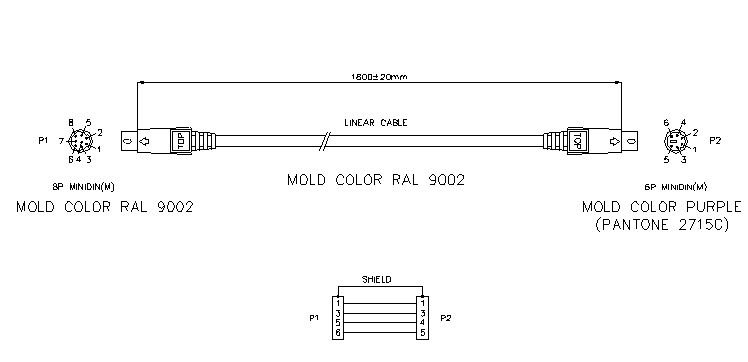
- fromGHtiproVSprehCABLE.jpg (20.04 KiB) Viewed 5558 times
Posted: 28 Jan 2012, 13:21
by kbdfr
Well, obviously your keyboard is
kaputt. I'll take it for shipping costs

On a more serious note: just wait for the cable 7bit is sending to you. I'm quite confident it will work fine.
Posted: 29 Jan 2012, 12:32
by Icarium
Okay, finally got 32 bit XP installed and, guess what, it works.